Master Styles, Templates, Track Changes, and Documents That Don't Fight Back
You nudge one line and three pages rearrange themselves. The picture jumps. The numbering restarts at 1 for reasons known only to Word. If that sounds familiar, you're exactly who this course was built for. Microsoft Word for the Modern Office teaches the small set of ideas that make documents behave: the hidden characters that control layout, the styles that format a whole document in one click, and the sections, anchors, and templates behind every professional file. You've probably used Word for years; this is the course where you finally learn it properly. This is Expert Skills' own Microsoft Word certificate course, independent of any Microsoft program.
Through 14 comprehensive modules and 50 in-depth lessons, you'll learn to:
This course is accredited by Expert Skills and recognized internationally for professional development. When you pass the final exam, you become eligible to order your official personalized diploma, printed with your name and the credential: Microsoft Word Certification. Order your official diploma here once you've passed.
You get two months of full access from the day you enroll, and the course is completely self-paced. Most students finish in 10 to 14 hours of study spread across a few weeks. Need more time? You can extend your access on our site for a small fee.
Document fluency is quietly screened everywhere: admin and executive assistant roles, HR, legal support, operations, and any job where the document is the work product. The person whose files never break, whose reports arrive with a working table of contents, and who handles track changes calmly earns a reputation fast. This course builds exactly those skills, on the real documents offices produce every day.
Below is the beginning of the first lesson. Enroll to access all 50 lessons.
Yes. Expert Skills is registered with the UK Government's UK Register of Learning Providers (UKPRN 10092631), and the course is recognized internationally for professional development.
Most students arrive as long-time users who never learned the underlying model. If styles, section breaks, image anchors, or multilevel numbering ever surprise you, the course will change how you work within the first three modules.
The course is written for modern Microsoft 365 Word and teaches concepts over button locations, so your skills survive Microsoft's interface updates.
A full module is devoted to exactly that: a stable, professional resume architecture that survives PDF export and other computers, built step by step.
Issued under our UKRLP registration (UKPRN 10092631). Recognized in the United States and United Kingdom.
 UKPRN 10092631
Enroll today, get instant access.
Enroll to continue reading
Get instant access to all 50 lessons.
Two months of full access, self-paced, with the option to extend for a small fee if life gets busy.
Yes. The lessons work beautifully on phones, tablets, and computers, though you'll want a computer handy when you practice in Word itself.
Ready to stop fighting your documents? Enroll in Microsoft Word for the Modern Office today and join Expert Skills learners whose documents finally behave.
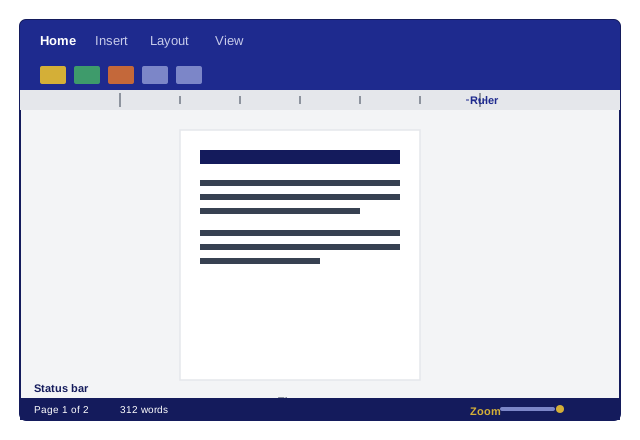 The five regions of the Word window, and the page where the work happens.