From Blank Slide to Boardroom-Ready Presentations, No Design Skills Needed
Most people learn PowerPoint by trial and error, and it shows on the screen. This course teaches you the tool and the design rules together, so your slides stop looking homemade and start looking expert-made. Built for office workers, managers, job seekers, and business owners who present at work, the Microsoft PowerPoint Certificate Course takes you from a blank file to clean, persuasive, boardroom-ready presentations. No design skills needed, no prior experience required, and a Microsoft PowerPoint Certification you can showcase when you pass.
Through 14 comprehensive modules and 50 lessons, you'll master both the software and the craft:
This course is accredited by Expert Skills and recognized internationally for professional development. When you pass the final exam, you become eligible to order your official personalized Microsoft PowerPoint Certification diploma, printed with your name and course title. It is an optional upgrade that many learners choose to display at work or feature on LinkedIn. Order your official diploma here.
You get two months of full access from the day you enroll, and the course is completely self-paced. Most learners finish in 10 to 14 hours of study, spread across evenings or weekends. Need more time? You can extend your access on our site for a small fee.
PowerPoint is one of the most requested software skills in office job listings, and strong presentation skills travel with you across every industry. The skills in this course apply directly to roles and situations like:
Below is the beginning of the first lesson. Enroll to access all 50 lessons.
Yes. Expert Skills is registered under UK Gov / UKRLP (UKPRN 10092631), and the course is accredited by Expert Skills and recognized internationally for professional development.
No. The course starts from the very first click and builds up to advanced skills like slide masters, chart design, and Morph transitions. If you already know the basics, the early lessons move quickly and the design modules will still transform your slides.
The course is written for Microsoft 365 PowerPoint on Windows, and nearly everything applies to recent versions, Mac, and PowerPoint for the web. AI features like Designer and Copilot are taught as optional accelerators, so you lose nothing without them.
Both. Alongside the software skills, you'll learn how to structure a persuasive deck from any report, write titles that state your point, and deliver with Presenter View, rehearsal tools, and a pre-presentation checklist.
Issued under our UKRLP registration (UKPRN 10092631). Recognized in the United States and United Kingdom.
 UKPRN 10092631
Enroll today, get instant access.
Enroll to continue reading
Get instant access to all 50 lessons.
You have two months of full access, which is plenty for the 10 to 14 hours of content, and you can extend your access for a small fee if life gets busy.
Yes. The lessons are fully readable on any device, so you can study on your commute and practice in PowerPoint when you're back at your desk.
Ready to build presentations that get you noticed? Enroll in the Microsoft PowerPoint Certificate Course today, join thousands of Expert Skills learners, and walk into your next meeting with a deck that looks like a professional built it. Because one did: you.

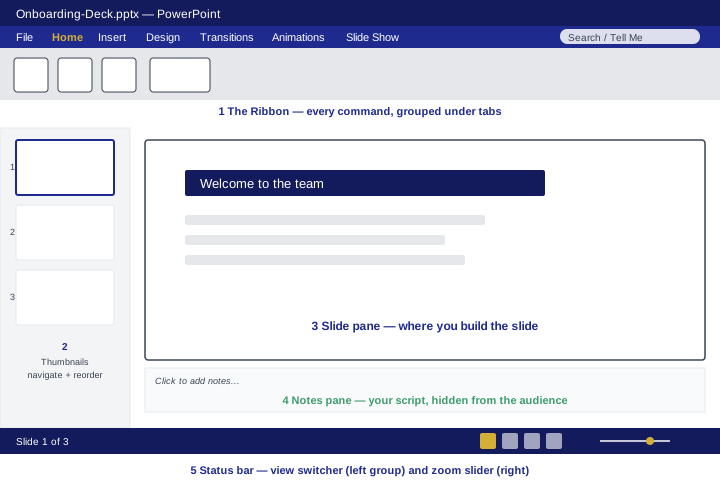 The five areas of the workspace. Learn these names once and every later step lands fast.